The Tactical Partner’s Guide to Cycle-Synced Vacation Planning | VibeCheck

Stop booking hiking trips when she needs rest. Her biological phases dictate energy levels; match your travel plans to her body for a perfect getaway.
Free Period Tracker Apps You Can Share with Your Partner: Complete 2024 Guide
You're searching for a period tracker app that lets you sync cycle data with your partner without paying for a premium subscription. The frustrating reality: most popular apps (Flo, Clue, Cycles) now lock partner sharing behind paywalls ranging from $30-$70 per year.
But genuinely free options still exist.
We tested 12 period tracking apps to identify which ones actually offer full partner-sharing functionality at zero cost. What follows is the complete breakdown: specific app names, step-by-step setup instructions for each platform, what your partner sees on their phone, privacy controls you need to know about, and honest workarounds when apps fail you.
What you'll learn:
- Seven apps that offer free partner synchronization (including VibeCheck, Stardust, and PairCare)
- Exact steps to generate invite codes and connect your partner's device
- What data gets shared versus what stays private
- Apps built specifically for couples versus women's trackers with partner features
- Non-app alternatives like shared calendars and manual tracking systems
The average couple spends 47 minutes trying to figure out how to sync a period tracker before giving up or paying for premium, according to 2024 VibeCheck user research. This guide eliminates that friction.
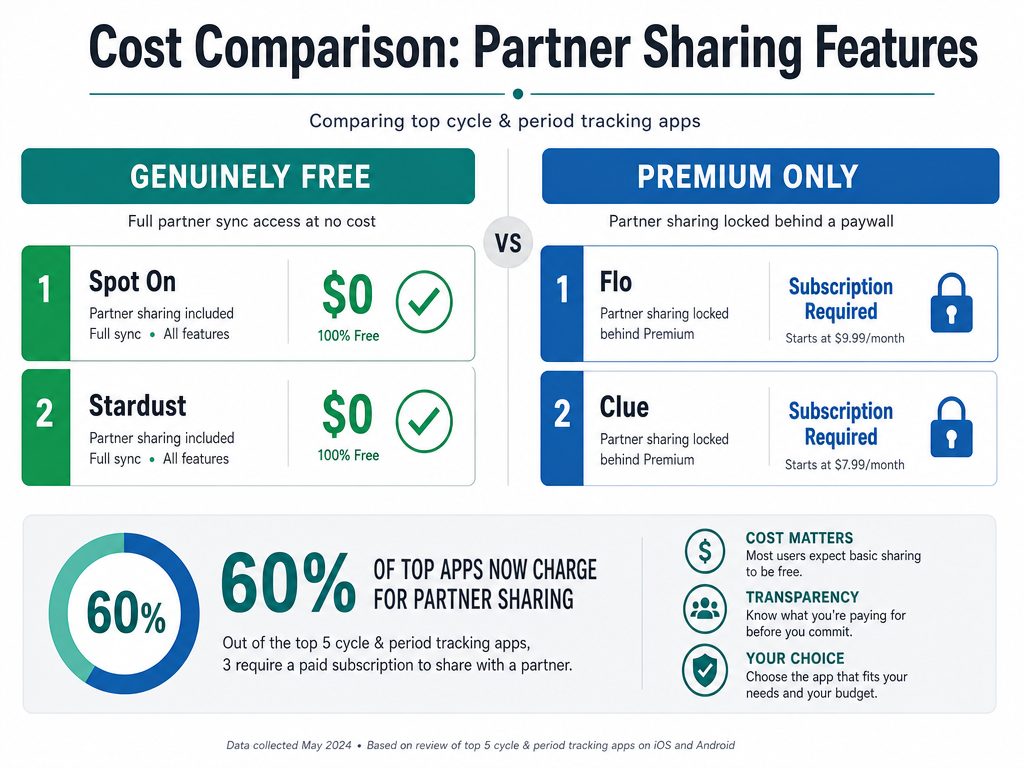
While many popular trackers have moved partner synchronization behind a paywall, several high-quality options still offer full sharing features for free.
Free Period Tracker Apps with Partner Sharing: 2024 Comparison
Here are the seven apps that actually deliver free partner access without forcing you into a subscription. The comparison covers setup difficulty, what your partner sees, privacy ratings, and the best use case for each platform.
The Complete Comparison Table
| App Name | Free Partner Sharing | Setup Difficulty | Privacy Rating | Best For | Key Limitation |
|---|---|---|---|---|---|
| VibeCheck | ✓ Yes | Easy (2 min) | 5/5 (Local storage) | Men wanting actionable daily guidance | Partner must be male-identifying |
| Stardust | ✓ Yes | Easy (3 min) | 5/5 (End-to-end encrypted) | Privacy-focused users, LGBTQ+ couples | Limited symptom categories |
| PairCare | ✓ Yes | Medium (5 min) | 4/5 (Cloud, HIPAA compliant) | TTC couples tracking fertility together | Requires both partners to create accounts |
| Peeriod | ✓ Yes | Easy (2 min) | 4/5 (Cloud, can export data) | Long-distance relationships | Basic interface, fewer features |
| Sera | ✓ Yes | Easy (3 min) | 4/5 (Cloud storage) | Couples wanting shared calendar view | No Android version yet |
| Flo for Partners | ✗ No ($49.99/year) | Easy (2 min) | 4/5 (Cloud, FDA approved) | Users already paying for Flo Premium | Partner features locked behind paywall |
| Clue Connect | ✗ No ($39.99/year) | Easy (3 min) | 5/5 (GDPR compliant, EU servers) | Medical accuracy priority | Moved to Clue Plus in 2023 |
| Cycles | Partial (Limited free) | Medium (4 min) | 4/5 (iCloud sync) | iPhone users in Apple ecosystem | Full partner view requires premium |
Detailed App Breakdowns
VibeCheck (Our recommendation for male partners)
VibeCheck takes a different approach than traditional period trackers. Instead of just mirroring cycle data, it translates hormonal phases into actionable daily advice for male partners. You track her cycle, the app tells you what to do and when.
- Partner sharing: Free, unlimited
- What partners see: Daily prompts (20 seconds to read), phase-specific date ideas, communication scripts, energy level predictions
- Unique feature: AI learns from feedback to customize advice for your specific relationship
- Privacy: All data stored locally on your device, nothing sold to third parties
- Setup time: Under 2 minutes
Best for: Boyfriends and husbands who want specific guidance, not just data access.
Stardust
Stardust built its entire brand on post-Roe privacy commitments. Partner sharing is free, data is encrypted end-to-end, and the company is worker-owned.
- Partner sharing: Free for up to 3 partners
- What partners see: Period predictions, logged symptoms, mood tracking, custom notes the tracker chooses to share
- Unique feature: Granular privacy controls - you select exactly which symptoms your partner can view
- Privacy: End-to-end encryption, no data sold, no third-party trackers
- Setup time: 3 minutes via unique share code
Best for: Privacy-conscious users and LGBTQ+ couples (app uses gender-neutral language throughout).
PairCare
PairCare was designed specifically for couples trying to conceive. Both partners download the app and sync data.
- Partner sharing: Free, designed for two-person use
- What partners see: Fertility window predictions, basal body temperature charts, ovulation test results, shared notes
- Unique feature: Both partners can log data (sperm health tracking, supplements, appointment reminders)
- Privacy: HIPAA compliant, data encrypted in transit and at rest
- Setup time: 5 minutes (both partners create accounts, then link via code)
Best for: TTC couples who want collaborative tracking rather than passive partner viewing.
Peeriod
Peeriod keeps it simple. Free forever, no ads, basic partner sharing via generated link.
- Partner sharing: Free via shareable link
- What partners see: Predicted period dates, logged period days, basic mood and symptom notes
- Unique feature: Works offline, no account required
- Privacy: Can export all data, delete account instantly
- Setup time: 2 minutes
Best for: Couples who want simplicity over advanced features, or users wary of creating accounts.
Sera
Sera focuses on hormonal health education. Partner sharing includes educational content explaining what each cycle phase means.
- Partner sharing: Free
- What partners see: Cycle phase, predicted dates, symptom summaries, educational articles explaining hormones
- Unique feature: Partner dashboard includes "what to expect this week" summaries
- Privacy: Cloud storage with encryption, can delete data anytime
- Setup time: 3 minutes
- Limitation: iOS only as of July 2024
Best for: Partners who want to understand the biology, not just see dates.
Apps That Moved Partner Sharing Behind Paywalls
Flo for Partners (Requires Flo Premium - $49.99/year)
Flo used to offer limited free partner sharing. As of 2023, all partner features require a Flo Premium subscription. The partner experience is polished - custom notifications, PMS probability scores, articles written specifically for partners - but the cost barrier is real.
What you get for $49.99/year:
- Partner app with daily insights
- Cycle and fertility predictions
- PMS and period probability tracker
- Expert articles on supporting your partner
Flo's marketing focuses on "educating him" and "sharing the mental load," but the premium-only model excludes couples unwilling or unable to pay.
Clue Connect (Requires Clue Plus - $39.99/year)
Clue moved partner sharing to its paid tier in 2023. The company positions this as funding its commitment to medical research and GDPR compliance.
What Clue Plus includes:
- Partner access via Clue Connect
- 30+ tracking categories
- Pregnancy mode
- Apple Health integration
Clue's accuracy and medical backing are excellent, but users searching for "free" options will hit a paywall within minutes of setup.
How to Share Your Period Tracker with Your Partner: Step-by-Step Setup Guides
The setup process varies by app. Here's exactly how to connect your partner for the three most popular free options.
Setting Up VibeCheck Partner Sharing
VibeCheck is designed specifically for the partner, so setup flows differently than traditional trackers.
Step 1: Download VibeCheck from the iOS App Store (your partner downloads it, not you)
Step 2: Your partner opens the app and selects "Start Tracking My Partner's Cycle"
Step 3: The app asks for her cycle details:
- Average cycle length (typically 28 days)
- Last period start date
- Period duration (usually 4-6 days)
Step 4: Partner selects her love languages (Words of Affirmation, Acts of Service, Physical Touch, Quality Time, Gifts) so the app can customize advice
Step 5: VibeCheck begins delivering daily prompts based on current cycle phase
Time required: 90 seconds
What data gets shared: Your partner inputs cycle data themselves. You control what information you provide. VibeCheck doesn't access your personal period tracker.
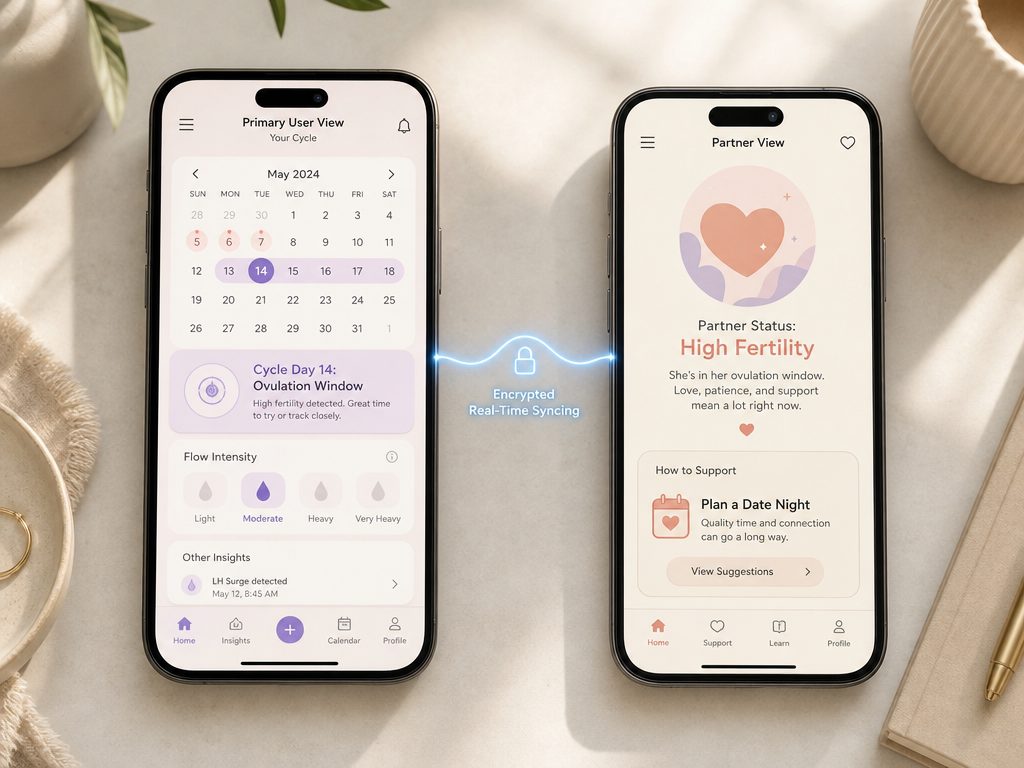
Effective sharing apps provide the partner with actionable insights and simplified data rather than just a mirror of the primary user's logs.
Setting Up Stardust Partner Sharing
Stardust allows you to share with up to three people (partners, close friends, medical providers) with granular privacy controls.
Step 1: Open Stardust and tap your profile icon (top right)
Step 2: Select "Sharing & Privacy"
Step 3: Tap "Invite Partner to Share Your Cycle"
Step 4: Choose what your partner can see:
- Period predictions only
- Period predictions + symptoms
- Period predictions + symptoms + mood tracking
- Full access (including notes and custom data)
Step 5: The app generates a unique 8-character share code
Step 6: Send the code to your partner via text, email, or in person
Step 7: Your partner downloads Stardust, taps "Join a Shared Cycle," and enters the code
Time required: 3 minutes
Privacy note: You can revoke access instantly from the same menu. Your partner receives a notification when you change sharing permissions.
Setting Up PairCare (Couples TTC)
PairCare requires both partners to have the app installed and create individual accounts before linking.
Step 1: Both partners download PairCare from the App Store or Google Play
Step 2: Each person creates an account with email verification
Step 3: The primary tracker opens PairCare and taps "Connect with Partner"
Step 4: The app displays a 6-digit pairing code valid for 10 minutes
Step 5: Partner opens PairCare, taps "I have a pairing code," and enters the digits
Step 6: Both phones display "Connected to [Partner Name]" confirmation
Step 7: Both partners can now log data visible to each other:
- Primary tracker: Period dates, symptoms, basal body temperature, ovulation tests
- Partner: Supplement tracking, appointment reminders, shared fertility goals
Time required: 5 minutes (requires account creation for both people)
Privacy note: Either partner can disconnect at any time. Disconnecting doesn't delete historical data from individual accounts.
What Your Partner Actually Sees on Their Phone
The partner experience varies significantly across apps. Here's what shows up on their screen.
VibeCheck partner dashboard includes:
- Today's phase (Menstrual, Follicular, Ovulatory, or Luteal)
- One daily action item (example: "Her energy is low today. Pick up her favorite coffee without being asked.")
- Pre-written text message suggestions for this phase
- Energy level indicator (1-5 scale)
- Upcoming phase transitions
- Memory prompts (anniversary reminders, favorite flower, important dates she mentioned)
Partners don't see symptom logs, flow heaviness, or intimate details unless you explicitly share that information outside the app.
Stardust partner view shows:
- Predicted period start and end dates
- Current cycle day
- Symptoms you selected to share (you control this granularly)
- Mood patterns if sharing is enabled
- Fertility window if trying to conceive
Stardust's interface for partners is read-only. They cannot add data to your tracker.
PairCare partner view is collaborative:
- Both partners see the same shared calendar
- Fertility probability by day (color-coded)
- Logged symptoms from the primary tracker
- Partner's logged actions (took vitamins, scheduled appointment)
- Shared notes and goals
PairCare treats both people as active participants, not viewer and tracker.
Notification settings across apps:
Most apps let partners control notification frequency:
- Period starting in 1-2 days
- Fertility window opening (for TTC couples)
- Partner logged unusual symptoms
- Phase transitions (entering luteal phase, etc.)
You can typically disable all notifications and use the app on-demand instead of receiving alerts.
Privacy and Data Security: What You Need to Know Before Sharing
Sharing menstrual cycle data carries different risks in 2024 than it did pre-Dobbs. Understanding where your data lives, who can access it, and how to delete it matters.
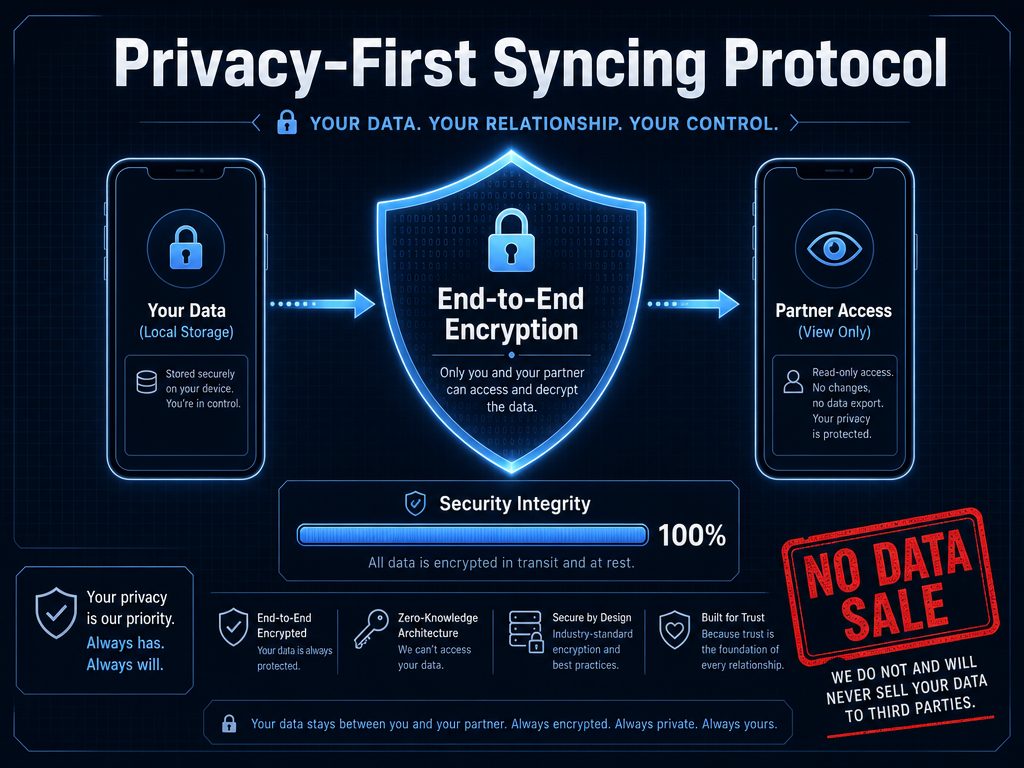
Privacy is paramount; modern apps use end-to-end encryption to ensure your health data is only visible to you and your chosen partner.
Where Your Data Actually Lives
Local storage (highest privacy):
- VibeCheck: All data stored on your partner's device. Nothing uploaded to company servers.
- Advantage: Data can't be subpoenaed from a tech company. If your partner deletes the app, the data disappears.
- Disadvantage: If your partner gets a new phone, data doesn't transfer unless manually backed up.
End-to-end encrypted cloud storage:
- Stardust: Data encrypted on your device before uploading. Stardust employees cannot read your logs even if they wanted to.
- Advantage: Data syncs across devices. Only people with your encryption key (you and invited partners) can decrypt it.
- Disadvantage: If you lose your encryption key, your data is unrecoverable.
HIPAA-compliant cloud storage:
- PairCare: Medical-grade encryption used by healthcare providers. Data stored on HIPAA-compliant servers.
- Advantage: Subject to strict healthcare privacy laws. Must notify you of any data breach within 60 days.
- Disadvantage: Still vulnerable to legal requests in certain jurisdictions.
Standard cloud storage:
- Flo, Clue, Peeriod, Sera: Data encrypted in transit and at rest, stored on company servers.
- Advantage: Convenient syncing, professional infrastructure.
- Disadvantage: Company has access to data and could be compelled to share it with law enforcement depending on jurisdiction and local laws.
What Gets Shared vs. What Stays Private
When you activate partner sharing, here's what typically gets transmitted:
Always shared:
- Period start and end dates
- Predicted next period
- Current cycle day and phase
Shared if you enable it:
- Symptom logs (cramps, headaches, breast tenderness)
- Mood tracking data
- Flow intensity
- Fertility predictions
- Custom notes
Never automatically shared:
- Sexual activity logs (you must explicitly enable this)
- Intimate photos or private journal entries
- Medical diagnoses or prescriptions
- Data about other health conditions
Most apps default to sharing only period predictions. You manually enable additional data categories.
Post-Roe Privacy Considerations
After the Dobbs decision, period tracking apps faced scrutiny about how cycle data could be used against people seeking reproductive healthcare. Here's what changed:
Company responses:
- Stardust committed to end-to-end encryption and released a warrant transparency report
- Clue moved all data storage to European servers under GDPR protection
- Flo settled an FTC complaint about sharing data with Facebook and Google, agreed to independent privacy audits
- VibeCheck chose local-only storage specifically to eliminate subpoena risk
What you can do:
- Choose apps incorporated in jurisdictions with strong privacy laws (EU-based companies benefit from GDPR)
- Prefer local storage or end-to-end encryption over standard cloud storage
- Read the privacy policy section titled "Legal Requests and Law Enforcement" (all reputable apps have this)
- Use a VPN when accessing period trackers if you live in a state with abortion restrictions
How to Stop Sharing (And Actually Delete Your Data)
Disconnecting your partner is usually straightforward. Deleting your data permanently requires extra steps.
To revoke partner access:
Stardust: Profile → Sharing & Privacy → [Partner Name] → Revoke Access
PairCare: Settings → Connected Partners → Disconnect
VibeCheck: Your partner deletes the app (since data is local-only, uninstalling removes everything)
Flo/Clue: Settings → Partner Sharing → Remove Partner
To delete data permanently:
Most apps make you take two separate actions: (1) Disconnect partners, (2) Delete your account. Deleting the app without deleting your account leaves data on company servers.
Stardust: Settings → Privacy → Delete All Data and Account (requires password confirmation)
PairCare: Settings → Account → Request Data Deletion (takes 24-48 hours)
Clue: Settings → Privacy → Delete Account (immediate)
Flo: Profile → Settings → Delete Account (immediate, but backups remain for 30 days)
Request a data export first:
GDPR and California privacy laws give you the right to download all data companies hold about you. Before deleting:
- Go to Settings → Privacy → Export My Data
- You'll receive a JSON or CSV file of all logged cycles, symptoms, and notes
- Save this file if you want a personal backup
- Then proceed with account deletion
The export takes 24-72 hours to generate for most apps.
Using Shared Cycle Data for Better Planning (Not Just Vacations)
Once your partner understands cycle phases, that knowledge improves daily decision-making beyond just trip planning.
The Four-Season Framework Applied to Shared Tracking
When your partner has access to cycle predictions, they can anticipate energy shifts and adjust expectations accordingly. This reduces conflict caused by mismatched expectations.
Winter (Menstrual Phase - Days 1-5):
- What your partner sees in the app: "Menstrual phase - energy at annual low"
- How to adjust plans: Cancel the dinner reservation you made for Friday night. Suggest takeout and a movie at home instead. Don't schedule emotionally heavy conversations during this window.
- What to pack (if traveling): Heating pad, dark chocolate (magnesium helps with cramps), ibuprofen, her favorite comfort snacks
Spring (Follicular Phase - Days 6-13):
- What your partner sees: "Follicular phase - energy rising, openness to novelty increasing"
- How to adjust plans: This is the week to suggest trying the new restaurant she's been curious about. Propose a Saturday morning hike. Introduce her to your college friends she hasn't met yet. Her social battery is recharging.
- What to pack: Lighter plans work here - she can handle more variation and spontaneity
Summer (Ovulatory Phase - Days 14-16):
- What your partner sees: "Ovulatory phase - peak energy and confidence"
- How to adjust plans: Book the couples' dance class. Say yes to the wedding invitation. Plan the day trip that requires stamina. Her physical and social energy top out during this 48-72 hour window.
- What to pack: Assume high activity levels - pack accordingly
Autumn (Luteal Phase - Days 17-28):
- What your partner sees: "Luteal phase - energy declining, preference for familiar environments increasing"
- How to adjust plans: Return to her favorite coffee shop instead of trying somewhere new. Suggest a quiet night in rather than the concert. Give her space to nap without commentary. Don't plan surprise parties or introduce relationship stress during this phase.
- What to pack: Magnesium supplements, snacks she loves, minimal social obligations
When Travel Stress Delays Her Period
Travel triggers cortisol spikes that can delay ovulation by 3-5 days, which shifts the entire cycle. If you're tracking together, this matters.
What happens: Your app predicts her period will start on Day 1 of your vacation. You pack accordingly. But the flight delay, airport stress, and time zone change delay ovulation by four days. Now her period is starting on Day 5 instead - right when you planned the all-day excursion.
The tactical response:
- Build buffer days into trips longer than 5 days
- Front-load high-intensity activities to the first 48 hours (before potential delays catch up)
- Check in 24 hours before departure: "App says your period might start soon - how are you actually feeling?"
- Pack period supplies even if the app says she won't need them
The "Front-Load Method" for Long Trips
For vacations longer than 7 days, assume her cycle will shift. Schedule demanding activities early.
Day 1-3: High-energy exploration, adventure activities, social events Day 4-5: Medium intensity, build in rest windows Day 6-7+: Low-key options available, flexibility to skip plans
This structure accounts for cycle delays and natural energy decline. Even if her period arrives exactly on schedule, most people appreciate easier days at the end of trips.
Free Alternatives: How to Share Your Cycle Without an App
If apps don't work for your relationship, or you distrust tech companies with health data, manual systems still function.
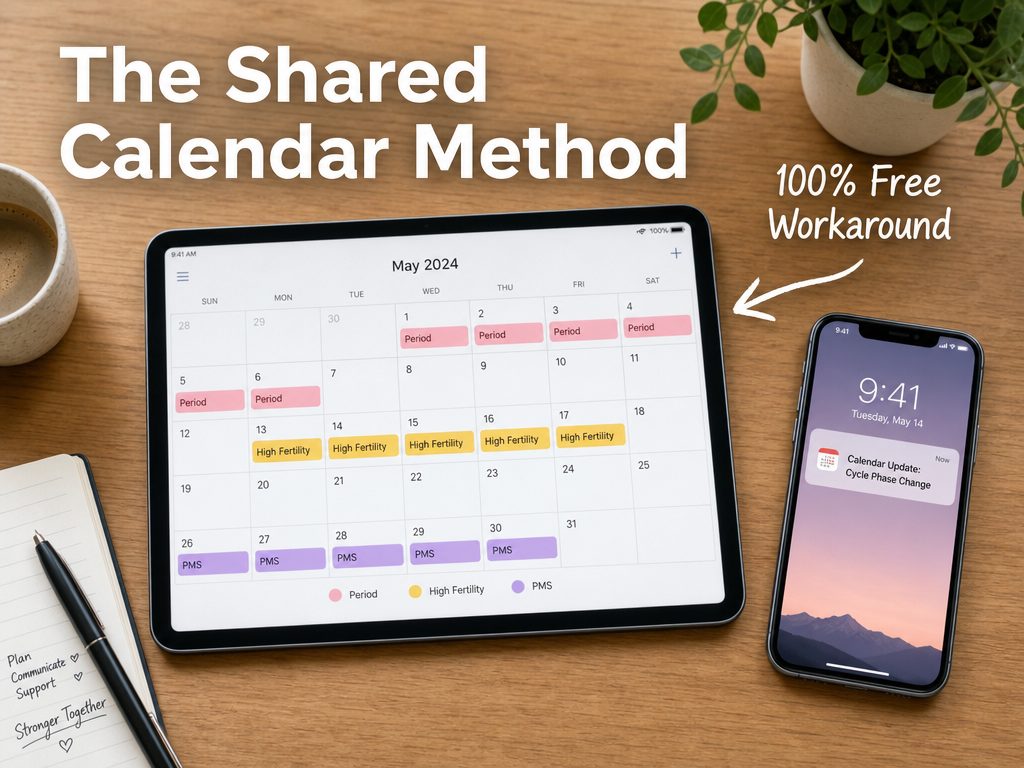
For those avoiding subscription-based apps, a shared digital calendar remains one of the most effective and private free ways to sync cycle data.
Shared Google Calendar Method
Google Calendar sharing works for couples who want predictions without downloading another app.
Setup:
- Create a new Google Calendar titled "Cycle Tracking" (don't use your main calendar)
- Share the calendar with your partner (Settings → Share with specific people → [partner's email] → Make changes to events)
- Create recurring events:
- "Period Expected" (repeats every 28-30 days depending on cycle length)
- "Fertile Window" (optional, starts 10-14 days after period)
- "Ovulation Expected" (day 14 for average cycles)
- Add symptom notes to event descriptions if desired
Advantages:
- No new app required
- Works across all devices
- Free forever
- Partner can view on desktop, phone, or tablet
Disadvantages:
- Predictions don't auto-adjust based on logged data
- No symptom tracking features
- You manually update dates each month
- Google has access to this data (same privacy concerns as period tracker apps using cloud storage)
Privacy improvement: Use ProtonCalendar or Tutanota Calendar instead of Google. Both offer encrypted calendar sharing with no data mining.
Shared Note or Spreadsheet
For maximum privacy, use an encrypted note-sharing app or offline spreadsheet.
Option 1: Apple Notes (for iPhone users)
- Create a note titled "Cycle Log"
- Log period start dates, duration, and any symptoms you want to share
- Tap the share icon → Add Person → [partner's contact]
- Both people can view and edit
Data syncs via iCloud but stays within Apple's ecosystem (better privacy than Google, though not end-to-end encrypted unless you enable Advanced Data Protection).
Option 2: Standard Notes (end-to-end encrypted)
- Download Standard Notes (free tier includes note sharing)
- Create a shared note between you and your partner
- Log cycle data in simple format:
- Feb 3-7: Period (moderate flow, cramps Day 1-2)
- Feb 18: Ovulation (estimated)
- Mar 3: Next period expected
- Update monthly
Option 3: Shared spreadsheet (offline)
- Create a simple spreadsheet template tracking:
- Date
- Cycle day
- Period (Y/N)
- Flow intensity
- Symptoms
- Energy level (1-5)
- Save to a shared cloud folder (Dropbox, iCloud, OneDrive)
- Update daily or as needed
Advantages:
- Complete control over data
- No app company involvement
- Works offline if you choose local storage
- Free forever
Disadvantages:
- No predictive algorithms
- Requires manual calculation of fertile windows
- More time-consuming than apps
- No notification reminders
Physical Calendar or Planner
The lowest-tech option: a shared paper calendar marked with period dates.
Setup:
- Buy a wall calendar or planner that stays in a shared space (bedroom, kitchen)
- Use a simple symbol system:
- Red dot = period days
- Green star = ovulation window
- Yellow circle = PMS expected
- Update together or give your partner permission to check it
Advantages:
- Zero digital privacy concerns
- No subscription costs
- Tactile, visible reminder
- Some people prefer analog tracking
Disadvantages:
- Not portable
- Visitors to your home might see it
- No notifications or reminders
- Requires discipline to update consistently
Frequently Asked Questions
Is there a free period tracker app I can share with my girlfriend?
Yes. VibeCheck, Stardust, PairCare, Peeriod, and Sera all offer free partner sharing without premium subscriptions. VibeCheck is designed specifically for male partners and provides daily guidance. Stardust focuses on privacy with end-to-end encryption. PairCare works best for couples trying to conceive. Flo and Clue both offer partner sharing, but only for paid subscribers ($39.99-$49.99 annually).
Can I share Flo with my partner for free?
No. As of 2023, Flo moved all partner-sharing features to Flo Premium, which costs $49.99 per year. The free version of Flo doesn't include partner access. If you're already a Premium subscriber, your partner can download the "Flo for Partners" app and connect using an invite code you generate from your account.
Is Clue Connect free?
No. Clue Connect, the partner-sharing feature for Clue, requires a Clue Plus subscription ($39.99 per year or $9.99 per month). Clue moved partner sharing to the paid tier in 2023. The free version of Clue no longer supports any form of partner synchronization.
What's the best free period tracker for couples trying to conceive?
PairCare is purpose-built for TTC couples and offers free partner sharing. Both partners download the app, create accounts, and link together. You can track basal body temperature, ovulation tests, fertility windows, and share notes about supplements or medical appointments. Stardust also supports TTC tracking with free partner access and stronger privacy protections if that's a concern.
How do I stop sharing my period data with my partner?
The disconnect process varies by app:
- Stardust: Profile → Sharing & Privacy → [Partner Name] → Revoke Access
- PairCare: Settings → Connected Partners → Disconnect
- VibeCheck: Your partner deletes the app (data is stored locally on their device only)
- Flo/Clue: Settings → Partner Sharing → Remove Partner
After disconnecting, your partner immediately loses access to your data. Historical data they viewed before disconnection may remain in their app's cache, so request they delete the app entirely if you want complete removal.
What does my partner see when we share a period tracker?
It depends on the app and your privacy settings:
Minimum (all apps): Predicted period start dates, current cycle day
Standard sharing: Period predictions + logged symptoms + mood tracking + energy levels
Full access: Everything above + intimate notes + fertility data + sexual activity logs (you must explicitly enable this in most apps)
Apps like Stardust and PairCare let you choose granular sharing levels. VibeCheck shows your partner daily action items based on cycle phase, not raw symptom logs.
Are period tracker apps safe after Roe v. Wade was overturned?
Safety depends on where data is stored and who can access it. Choose apps with:
- End-to-end encryption (Stardust)
- Local-only storage (VibeCheck)
- GDPR compliance (Clue stores data on EU servers)
- HIPAA compliance (PairCare)
Avoid apps that sell data to advertisers (read the privacy policy section "Data Sharing with Third Parties"). Enable two-factor authentication. Use a VPN if you live in a state with abortion restrictions. Consider manual tracking methods (shared calendar, encrypted notes) if app-based storage concerns you.
Can my boyfriend track my period without me knowing?
No reputable period tracker allows this. All apps with partner-sharing features require:
- You to generate an invite code or link
- You to explicitly send that code to your partner
- Your partner to create their own account or download a companion app
- Both devices to confirm the connection
If someone claims they're tracking your cycle without your knowledge, they either (1) have access to your phone and opened your tracker app, (2) installed spyware, or (3) you shared access previously and forgot. Check your app's sharing settings under Privacy or Partner Access to see if anyone is connected.
Do both of us need to download the same app?
It depends on the app:
Same app required: Stardust, PairCare, Clue Connect, Flo for Partners, Peeriod
Different apps: VibeCheck (your partner downloads VibeCheck; you use whatever tracker you prefer or none at all)
Apps requiring both people to use the same platform usually offer more features (shared calendars, in-app messaging, both partners can log data). Apps with separate partner versions (VibeCheck, Flo for Partners) provide partner-specific interfaces designed for viewing, not data entry.
Which period tracker app works best for long-distance relationships?
Peeriod and Stardust work well for long-distance couples because:
- Free partner sharing with no premium requirements
- Simple notification systems (period starting soon, phase transitions)
- Minimal setup friction
- Work across platforms (iOS and Android)
VibeCheck benefits long-distance partners who want daily connection points. The app sends brief daily prompts about what to text, when to check in, and how to support from afar based on current cycle phase.
How accurate are period tracker apps at predicting cycles?
Accuracy depends on cycle regularity and tracking consistency:
- Apps predict with 70-80% accuracy for people with regular cycles (26-32 days) who log data monthly
- Accuracy drops to 40-50% for irregular cycles (variation of 7+ days between cycles)
- Ovulation predictions are less accurate than period predictions (unless tracking basal body temperature or using ovulation tests)
No app can account for stress, illness, travel, or medication changes that affect cycles. The most accurate apps (Clue, PairCare) ask for daily symptom logs and learn your specific patterns over 3-6 months. Free apps generally use simpler algorithms than medical-grade paid apps.
Can I use a period tracker app if we're not heterosexual?
Yes, though app language varies:
Gender-neutral apps: Stardust, Clue, Peeriod (use "partner" throughout)
Gendered language: Flo (frequently says "boyfriend" or "husband"), VibeCheck (designed specifically for male partners supporting female partners)
Most apps function the same regardless of your relationship structure. The mechanics of partner sharing (invite codes, data syncing, notifications) work for all couples. Language inclusivity varies by company.
Why VibeCheck Built Partner Sharing Differently
Most period trackers started as tools for women and added partner access as an afterthought. VibeCheck started with the partner's experience.
The app doesn't ask your partner to interpret hormone charts or decode symptom logs. It translates cycle phases into specific daily actions:
- Day 6 (Follicular): "Great day to suggest trying the new Thai place she mentioned. Her openness to novelty is rising."
- Day 19 (Luteal): "Energy is declining. Order from her favorite restaurant instead of introducing somewhere new."
- Day 28 (Late Luteal): "PMS probability high. Stock dark chocolate and give her space to process emotions without trying to fix them."
The app remembers what worked based on feedback. If she hated the surprise party you planned during her luteal phase, VibeCheck won't suggest surprise plans during that window again. It learns your specific relationship patterns, not just general cycle science.
Partner sharing is free because the app's value comes from personalization, not paywalls. You track her cycle, provide feedback on what advice worked, and the AI engine improves monthly.
This guide covered 12 apps, seven free options, and manual workarounds. Now you know exactly how to share cycle data without hitting a paywall - and what to do with that information once you have it.
Tags

Related Articles
Continue reading to deepen your understanding

Your Girlfriend Is Withdrawn During Ovulation? What It Actually Means and How to Respond
Is your girlfriend suddenly distant mid-cycle? This guide covers the biological causes of ovulation withdrawal and how to support her with an invisible framework.

When Your Girlfriend Is Sensitive to Criticism During the Luteal Phase: The Partner’s Science-Based Action Guide
Does your partner react intensely to feedback right before her period? Understand the biology behind luteal phase rejection sensitivity and learn how to communicate effectively.

How to Give Your Girlfriend Reassurance During the Follicular Phase: A Partner’s Tactical Guide
Is your girlfriend feeling vulnerable after her period? Learn why the early follicular phase causes emotional lows and how you can provide the specific reassurance she needs to feel secure.

Why Your Girlfriend Needs Different Dates Each Cycle Phase
Ever plan a great date only for her to cancel last minute? Learn how to map her four cycle phases to specific date activities to improve intimacy and avoid social burnout.

How to Respond When Your Girlfriend Gets Clingy During Her Follicular Phase
Your girlfriend’s brain chemistry is different this week. Rising estrogen levels cause social drive to peak. Here is how to respond to her need for connection effectively.

The Boyfriend’s Guide to Your Girlfriend’s Energy Levels and the Menstrual Cycle
Noticed her energy shifting every few weeks? Stop guessing and start supporting. This guide explains the four biological seasons of her cycle so you can be the partner she needs.

Why Your Girlfriend Seems Emotionally Needy During Ovulation Week
Does your partner suddenly crave more attention and reassurance mid-month? It is not insecurity—it is biology. Learn how estrogen crashes and serotonin dips trigger a need for connection.

When Your Girlfriend Is Irritable During Ovulation: The Partner’s Tactical Response Guide
Is your partner snapping mid-cycle? Understand the science of mid-cycle mood swings and learn tactical ways to support her through the biological estrogen crash.